Browse multipage documents clearly.
Page thumbnails, zoom controls, document search, and reading mode keep large publications manageable.
 PubHarborPublisher archive studio
Private, local Publisher file recovery
Open compatible Microsoft Publisher documents on iPhone, iPad, and Mac. Review what converted, search readable text, and preserve pages as PDF or images—without uploading the file.
For the club newsletter, the community programme, or the business archive you still need to read. Start with one original file and check the conversion before buying Pro.
PUBLISHER RETIREMENT · OCTOBER 2026
Keep your original publications, make reference PDFs and check every converted page.
Read the archive checklist →A file viewer that explains itself
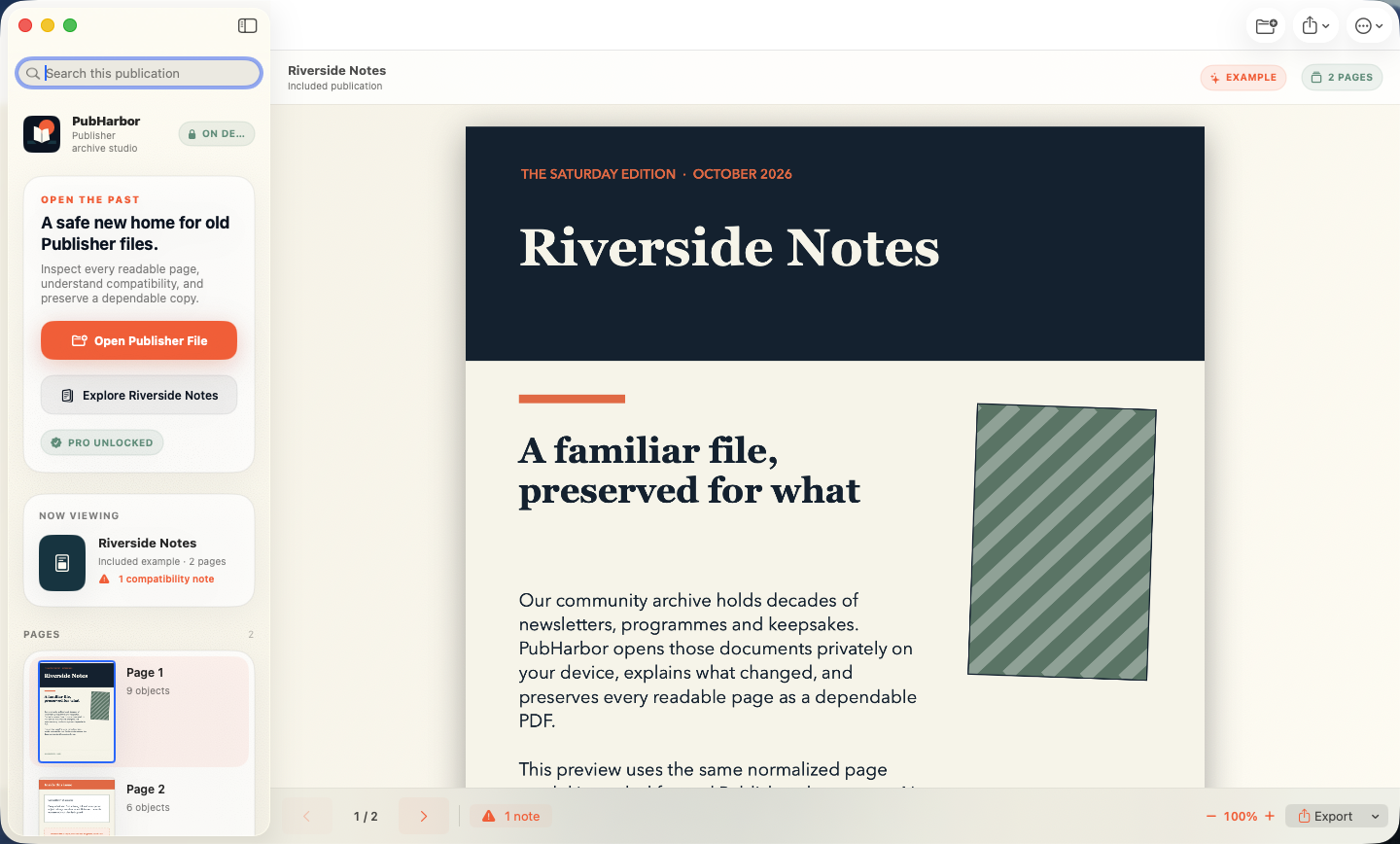
PubHarbor keeps the source, conversion state, readable pages, and warnings in one calm workspace. No account. No cloud hand-off. No mystery about what changed.
Import a compatible .pub document from Files or Finder. The original is never edited.
Move through thumbnails, zoom, and search extracted text while conversion notes remain visible.
Export searchable PDF or 144-DPI PNG and JPEG images to the destination you choose.
Made for careful recovery
Publisher documents can contain decades of fonts, linked media, and embedded objects. PubHarbor helps you understand the result instead of hiding uncertainty.
Page thumbnails, zoom controls, document search, and reading mode keep large publications manageable.
Unavailable fonts and unsupported objects become visible compatibility findings, not silent surprises.
Create searchable PDFs or page images without modifying or overwriting the Publisher source.
Process collections while protecting source documents and skipping outputs that already exist.
No document uploadReading, previews, extracted text, compatibility analysis, and exports run locally.
No account or advertisingNo profile, analytics SDK, advertising identifier, or cloud document service.
No source-file changesPubHarbor reads the selected file and writes new exports only where you choose.
Simple access
No subscription and no recurring bill. The App Store presents the current price for your storefront before purchase.
Keep the original
Conversion is best effort. Results vary with the Publisher version, installed fonts, linked media, and embedded objects. PubHarbor may substitute unavailable fonts or show diagnostic placeholders for unsupported content.
Always retain the original .pub file and review the compatibility report before relying on an export.
Before you begin
Compatible Microsoft Publisher documents with the .pub extension. A renamed PDF or Word document will not work. Support varies across Publisher generations and document features.
No. Document reading, previews, extracted text, compatibility analysis, and exports are processed locally on your Apple device.
Each distinct imported document counts once, up to three. Reopening a previously imported file does not count again, and the bundled example never counts.
No. PubHarbor reads the source and writes new exports only to a destination you choose.
PubHarbor requires iOS or iPadOS 17 or later, or macOS 14 or later.
Now on the App Store
Get PubHarbor for iPhone, iPad, and Mac. Start with three documents free.
Get PubHarbor